
Creating an Aimbot for Zombies
Instead of analyzing malware this time, I switched gears: I found Left 4 Dead 2 on sale on Steam, and I thought it would be a fun challenge to reverse engineer the game and build a simple aimbot for zombies.
One of the challenging parts of game hacking is reliably finding static addresses for key game objects like the player, entities, and health so those addresses remain valid when reloading or restarting the game. This requires a mix of experience, experimentation, and understanding how game engines structure memory. Tools like Hazedumper can help later, but I prefer to fully understand things manually through Cheat Engine first. For this tutorial, disable VAC by launching the game with the -insecure flag.
Below is a walkthrough of how I found the player health and the entity list pointer. I spent around a month debugging the game on and off while writing the aimbot, so hopefully this summary saves others time.
Overall Goal
The goal of this aimbot is to automatically aim at the closest alive zombie by reading entity data from memory, calculating aim angles, and smoothly writing them into the player’s view angles to avoid unnatural snapping.
Finding Entity list pointer
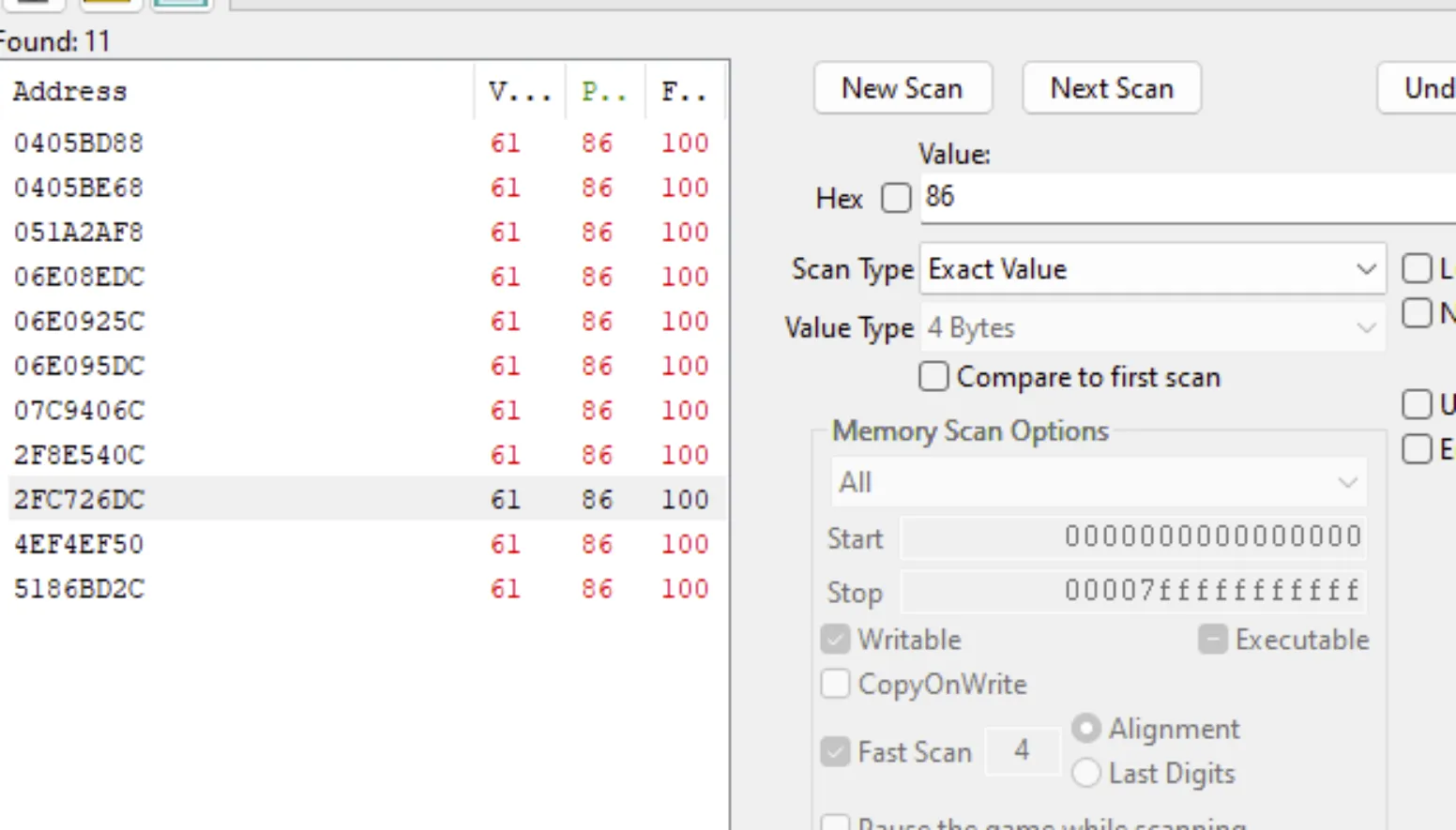
To find addresses for different game variables, I use Cheat Engine to scan for a value and then change it in-game (take damage to drop health, fire bullets to reduce ammo) to filter the results. Positions are trickier, but the same idea works: scan for the Z coordinate, move up stairs or jump, then rescan for the increased value until only a few candidates remain. Using this approach, I located the player’s health by repeatedly taking damage and rescanning until only a handful of addresses were left.
Left 4 Dead 2 uses both server.dll and client.dll. In single-player mode, the server runs locally, so modifying a value inside server.dll will update the actual in-game state, and the change will be reflected inside client.dll. However, the reverse is not true: client.dll simply mirrors the server state. (This is very useful when debugging. You always want to affect server-side values if possible.)
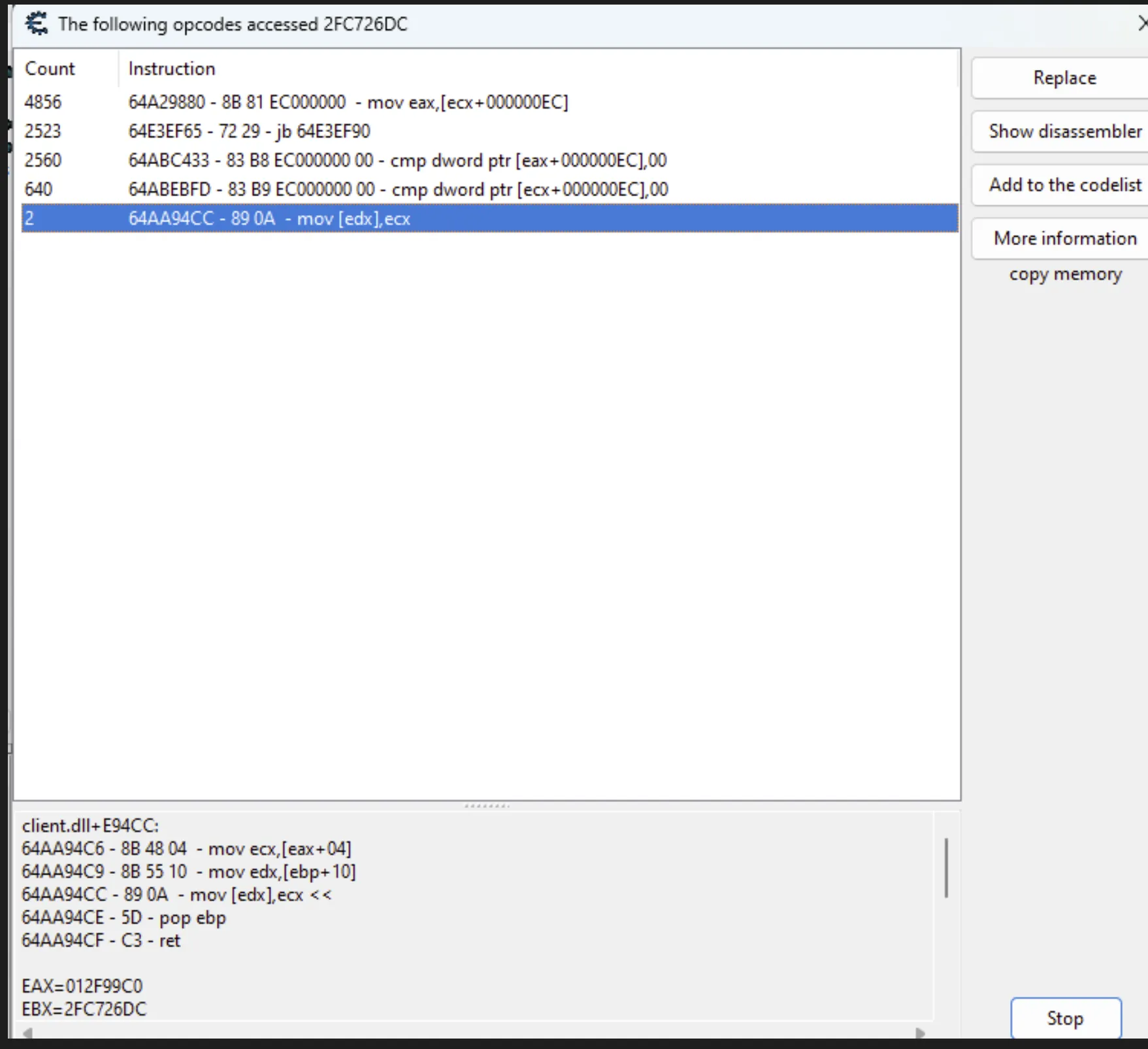
Next, I checked which instructions accessed this address. As mentioned earlier, both server-side and client-side instructions appear. Since the health field resides at offset 0xEC, this helps identify which accesses correspond to the correct entity structure. The access counter also helps validate the address, as higher counts usually indicate active gameplay usage.
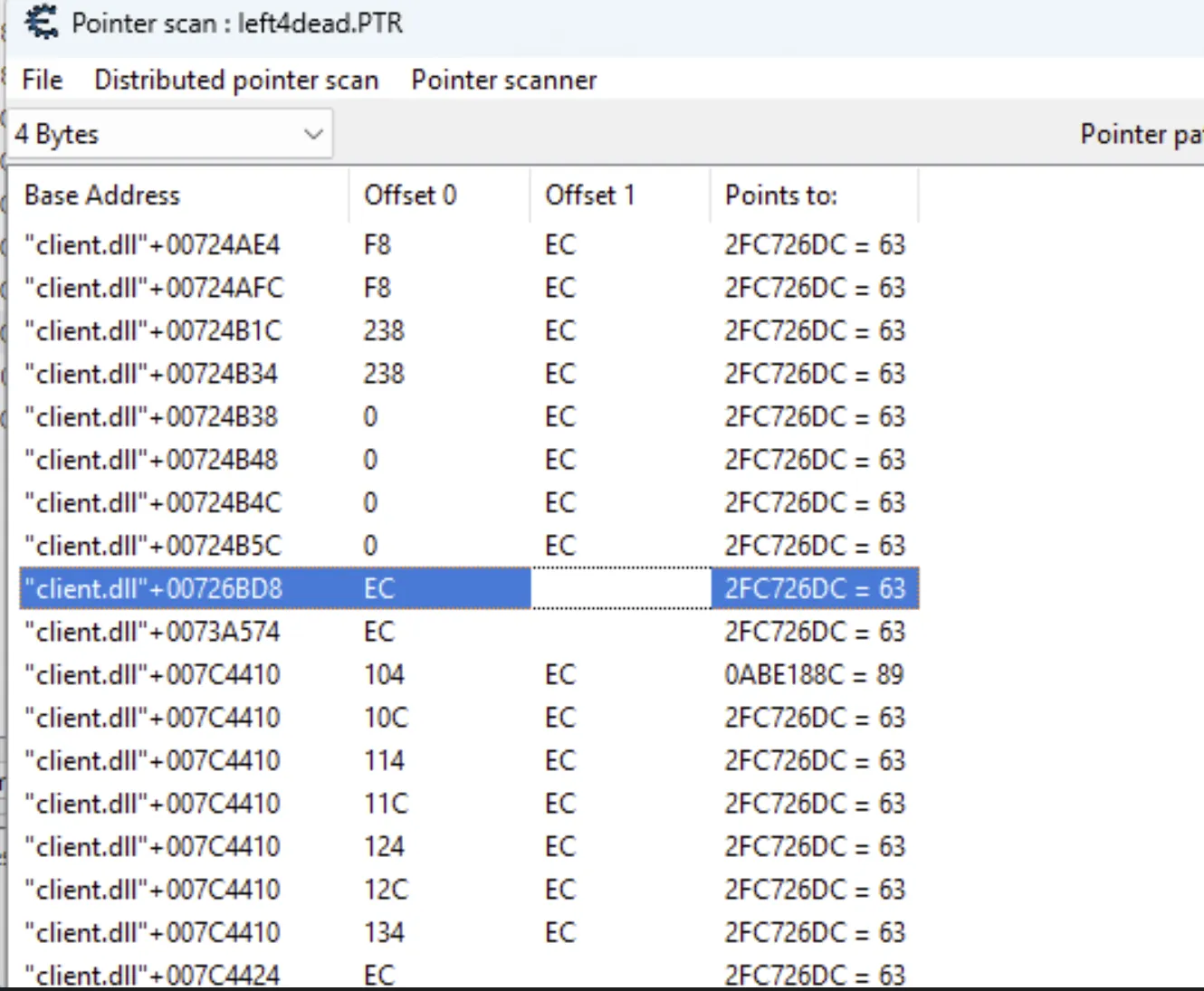
To locate a static pointer, I performed a pointer scan on the dynamic address using the offset 0xEC. Some games require multiple pointer scans across restarts, but here I found two promising results inside client.dll. Both pointed to the correct location. Over time, one may become invalid after a patch, so I keep both candidates until one consistently fails.
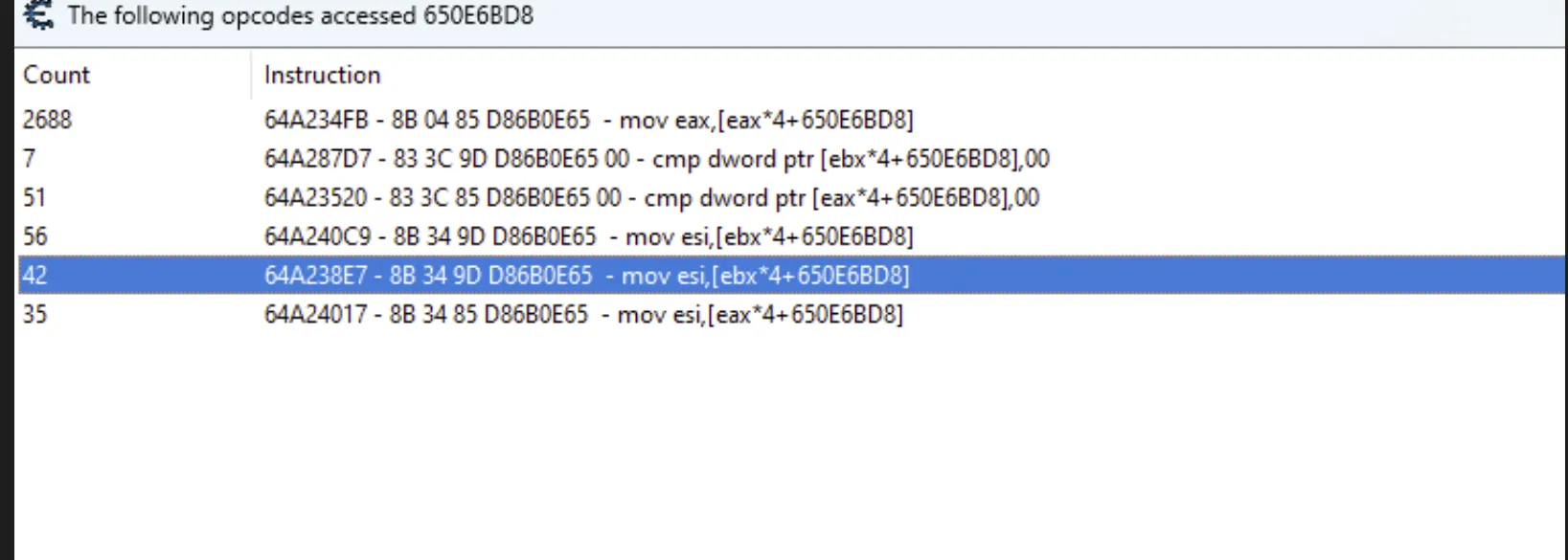
After locating the static player address, I checked what accesses it again. This time, the instruction used ebx*4 in the effective address calculation. Multiplying an index by 4 is a classic sign of an array of pointers, in other words, an entity list.
So here, ebx functions as the entity index, and the base address is the start of the entity array.
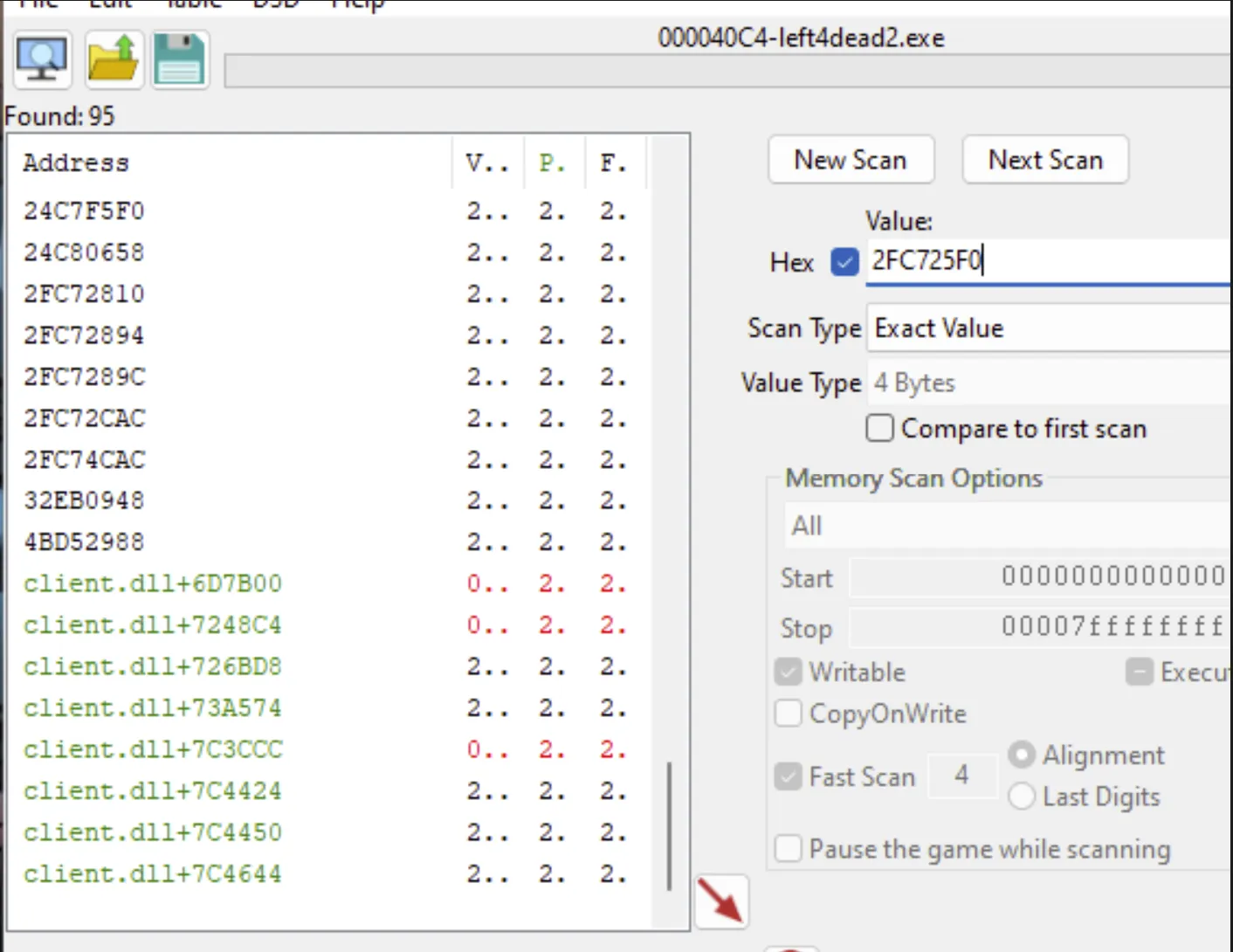
I then searched for the player’s address inside memory and looked at which static pointers reference it. The green entries indicated valid static addresses. After checking manually, I confirmed that: client.dll + 73A574 is the correct entity list pointer.
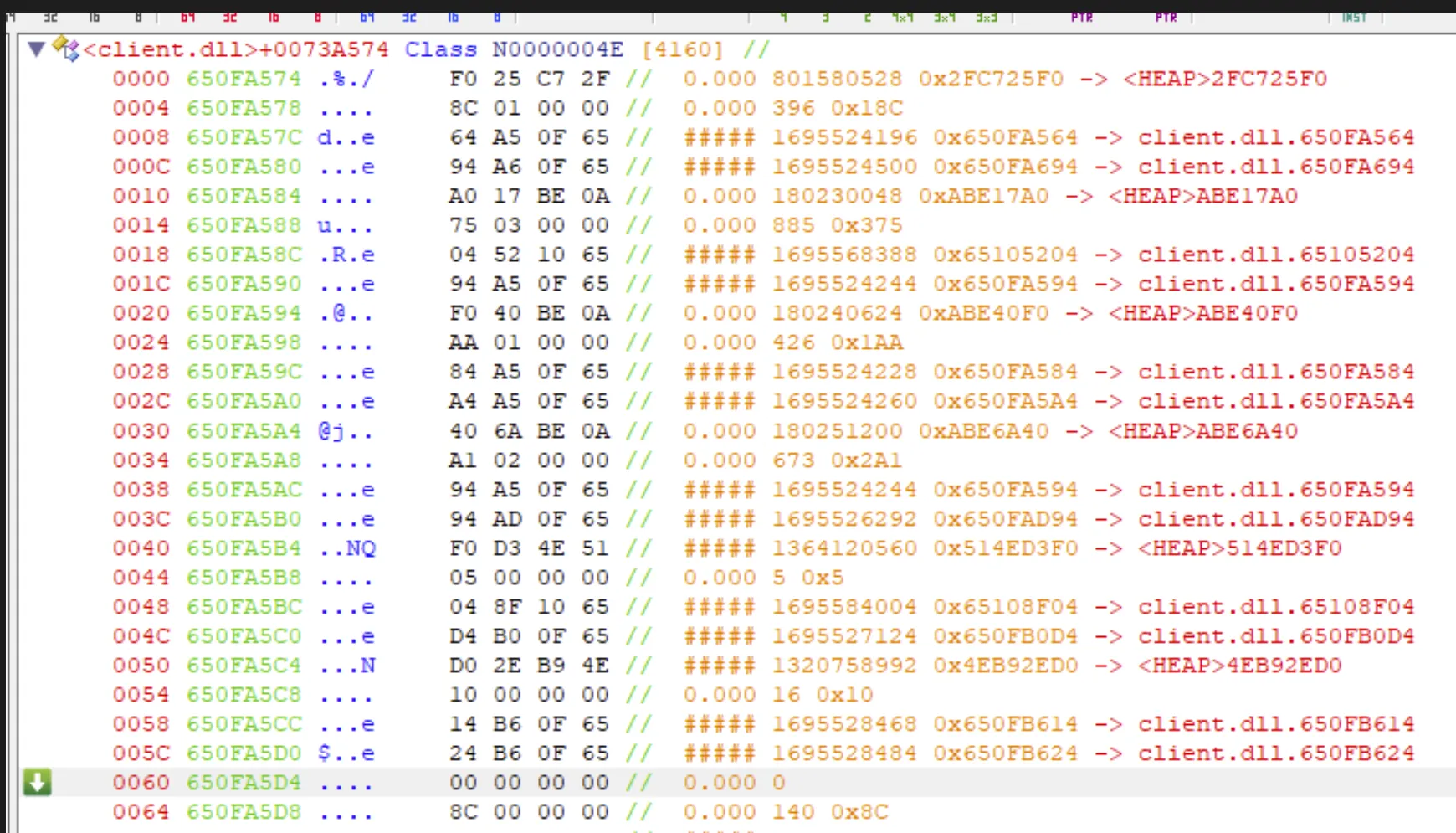
ReClass
helps visualize the entity list and its layout. I added client.dll + 0x73A574 as the entity list base. Each zombie or player object occupies a fixed-size slot spaced 0x10 bytes apart, and if a slot contains 0x60, it is empty. As new zombies spawn, the game fills these slots with entity pointers.
This live validation step is important because it confirms the structure dynamically rather than relying solely on static analysis. You can see zombies appear, disappear, and shift through these offsets, which confirms you are looking at the correct structure.
Memory Model
server.dll
 |- GameState (authoritative)
client.dll
 |- LocalPlayer
 |- EntityList
 |   |- Entity[0]
 |   |- Entity[1]
 |   |- ...
engine.dll
 |- ViewAngles
An overview of the game memory model where each address is being set to help visualise.
- Server.dll holds the authoritative game state (single-player runs server locally)
- Client.dll mirrors player, entity list, positions, health
- Engine.dll holds the player’s view angles, which we can override to control the camera.
Server.dll contains the authoritative game state, while engine.dll consumes view angles to render the player’s camera.
Offsets
namespace off {
    constexpr DWORD client_entityList = 0x73A574;
    constexpr DWORD client_localPlayer = 0x726BD8;

    constexpr uintptr_t m_vecOrigin   = 0x124;
    constexpr uintptr_t m_viewOffset  = 0xF4;
    constexpr uintptr_t m_iHealth     = 0xEC;
    constexpr uintptr_t m_lifeState   = 0x144;
    constexpr uintptr_t m_iTeamNum    = 0xF0;
    constexpr uintptr_t viewAngle     = 0x4D0C;
}
The following are the offsets that are going to be used by the aimbot:
- client_entityList: base pointer for entity list
- client_localPlayer: pointer to the local player
- m_vecOrigin: entity position
- m_viewOffset : eye height offset from origin (used to compute eye position)
- m_iHealth: Health address of the entity
- m_lifeState: alive/dead validation
- m_iTeamNum: team check for filtering
- viewAngle: view angles (engine.dll)
Some offsets were verified manually; others can be sourced from dumpers or community references.
Eye Position Calculation
static Vector3 eyePosLocal(uintptr_t local) {
    Vector3 o = mm.readMem<Vector3>(local + off::m_vecOrigin);
    Vector3 vo = mm.readMem<Vector3>(local + off::m_viewOffset);
    return o + vo;
}
To aim correctly, we need the position of the player camera, not just the player’s feet. m_vecOrigin is the base world position (roughly feet/ground), and m_viewOffset is the height of the camera above that base. Adding them gives the exact eye position used for aiming and ray checks. If you skip m_viewOffset and aim from the origin, your shots will look slightly off, and the error gets worse as target height changes.
Angle Math
Let’s go over the geometry involved. Once we pick a target, we need two angles to point the camera at it: pitch (up/down) and yaw (left/right).
inline float Wrap180(float a) { while (a > 180.f)a -= 360.f; while (a < -180.f)a += 360.f; return a; }
inline float ClampPitch(float p) { if (p > 89.f)p = 89.f; if (p < -89.f)p = -89.f; return p; }

Ang CalcAimAngles(const Vector3& src, const Vector3& dst)
{
    const float dx = dst.x - src.x;
    const float dy = dst.y - src.y;
    const float dz = dst.z - src.z;
    const float hyp = std::sqrt(dx * dx + dy * dy);

    Ang a;
    a.yaw = Wrap180(std::atan2f(dy, dx) * 180.f / float(M_PI));
    a.pitch = ClampPitch(-std::atan2f(dz, hyp) * 180.f / float(M_PI));
    return a;
}
We compute pitch and yaw from the vector between the player’s eye and the target point.
Here is how the function is used in the aimbot loop. We compute the local player’s eye position, get an aim point on the target entity, then calculate the angles from eye to target:
Vector3 myEye = eyePosLocal(local);             // player eye
Vector3 tgt = targetPointEntity(best.ent);      // enemy aim point
Ang  aim = CalcAimAngles(myEye, tgt);
 To calculate the first one (pitch: look up/down):
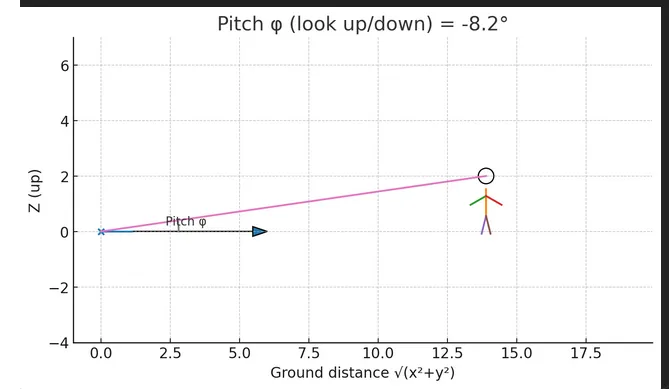
This graph shows the triangle we’re solving. The player and enemy each have x, y, z coordinates. For height, we use z and the horizontal distance between them. Pitch is computed using the vertical difference (dz) and the horizontal distance (sqrt(dx^2 + dy^2)).
Using trigonometry, the pitch angle is: pitch = -atan2(dz, sqrt(dx^2 + dy^2)). The negative sign matches Source’s inverted pitch convention.
To calculate the second one (yaw: rotate left/right):
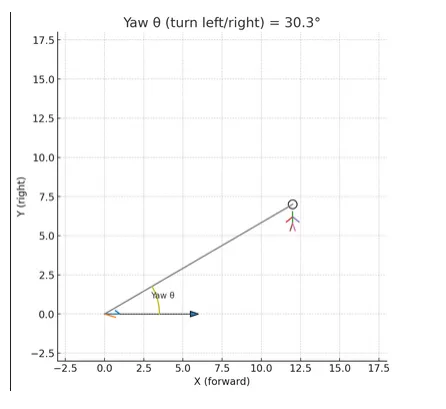
Yaw Angle is the angle between the Y and X coordinate of the player and enemy. Hence getting the able left/right aim wise will be: Yaw is calculated using atan2(dy, dx), which determines the left/right rotation in the X–Y plane based on the difference between the player and enemy X/Y coordinates.
Wrap180 and ClampPitch keep angles within Source’s valid ranges so the view doesn’t jump or flip.
Entity Iteration
Here is the loop that walks the entity list and uses getClosestEnemy to keep the nearest valid target. entMgrPtr is the entity list base pointer, MAX_ENTITIES is the number of slots to scan, and ENTITY_SLOT_STRIDE is the byte spacing between slots.
for (int i = 0; i < MAX_ENTITIES; ++i) {
    const uintptr_t ent = mm.readMem<uintptr_t>(entMgrPtr + i * ENTITY_SLOT_STRIDE);

    ClosestResult cand = getClosestEnemy(local, ent, i);
    if (cand.ent && cand.distSq < best.distSq) best = cand;
}
We scan every slot up to MAX_ENTITIES, read the pointer at that slot, and pass it to getClosestEnemy. If the candidate is valid and closer than our current best, we replace it.
I reattached the ReClass image for reference.
The entity list is a sparse array, so not every slot is valid. Each entry is a pointer stored in a fixed-size slot spaced 0x10 bytes apart. When a slot contains 0x60, it is empty (a sentinel value). As new zombies spawn, the game fills these slots with entity pointers.
constexpr size_t ENTITY_SLOT_STRIDE = 0x10;
uintptr_t ent = mm.readMem<uintptr_t>(entMgr + i * ENTITY_SLOT_STRIDE);
We iterate through the list and multiply by 0x10 to jump to the next slot, then read the pointer at that slot.
Entity Filtering Logic
ClosestResult getClosestEnemy(uintptr_t local, uintptr_t ent, int index)
{
    ClosestResult r;

    if (!ent) return r;

    const int life = mm.readMem<int>(ent + off::m_lifeState);
    if (life != 0) return r;

    const int hp = mm.readMem<int>(ent + off::m_iHealth);
    if (hp <= 0 || hp > 5000) return r;

    int localTeam = mm.readMem<int>(local + off::m_iTeamNum);
    int entTeam = mm.readMem<int>(ent + off::m_iTeamNum);

    if (entTeam == localTeam) return r;

    const Vector3 pos = mm.readMem<Vector3>(ent + off::m_vecOrigin);

    const Vector3 me = mm.readMem<Vector3>(local + off::m_vecOrigin);
    const float d2 = distSq3D(me, pos);

    r.ent = ent; r.index = index; r.distSq = d2; r.hp = hp;
    r.aim = CalcAimAngles(me, pos);
    return r;
}
We pick the closest valid enemy by computing distance for each entity. The checks remove invalid entities (null pointer, dead, absurd health values) and skip teammates by comparing team numbers. This keeps the list clean before we do any expensive angle math.
Writing View Angles
Ang cur = mm.readMem<Ang>(vaBase + off::viewAngle);
const float smooth = 0.35f;
Ang next{
    ClampPitch(cur.pitch + (aim.pitch - cur.pitch) * smooth),
    Wrap180(cur.yaw + (aim.yaw - cur.yaw) * smooth)
};
Cur is the current view angle. We move partway toward the target angle. The smooth factor prevents sudden snapping and makes the movement smoother.
Demo
The following clip shows the current state of the aimbot. At this stage, the goal is correctness rather than refinement: validating entity selection, angle calculation, and smooth view manipulation under live gameplay conditions.
Current issues and limitations
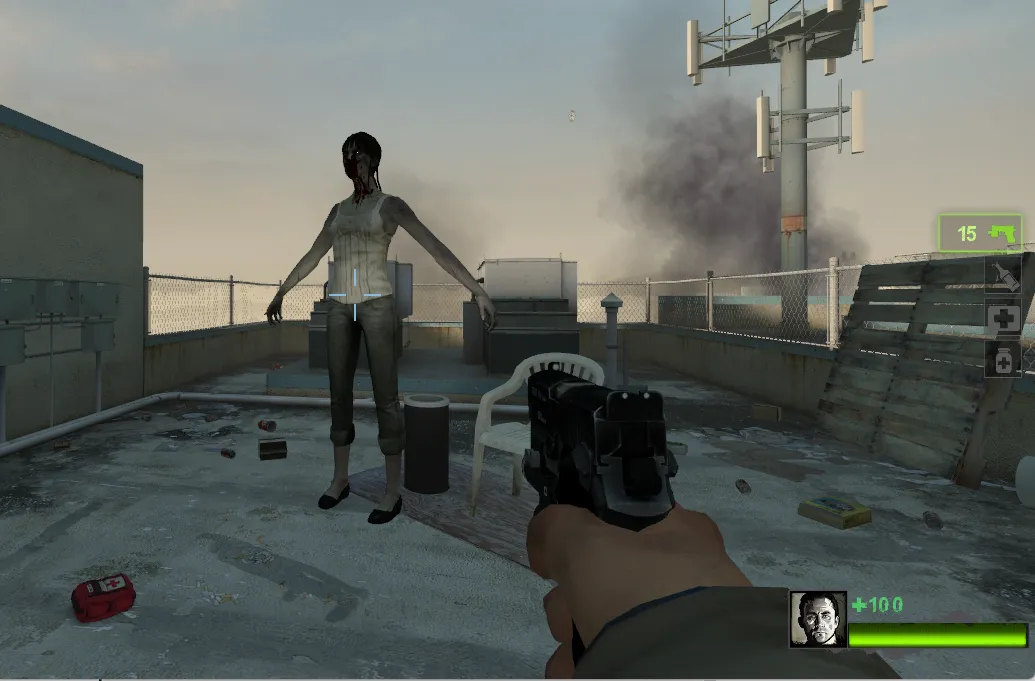
One of the main issues involves common infected (regular zombies). As shown above, some exist in an idle or dormant state and are not represented in the entity list used by the aimbot.
Even after they become active and start attacking, they do not consistently appear in the iterated entity list. As a result, the aimbot misses them both while idle and during active gameplay.
This suggests common infected are managed differently by the Source engine than special infected or players, and are likely stored or referenced outside the list we are iterating.
There are also areas to improve. Testing was done on a small sample size; in large hordes the aimbot can become unreliable due to rapid target switching and the lack of prioritization logic.
Additionally, because common infected vary in height and animation state, the current aiming logic does not always align with the head. In the demo, the aimbot occasionally aims slightly above or below the target.
Feedback, corrections, or alternative approaches are always welcome. Feel free to reach out by email. If you found this write up useful, I’d love to hear that as well.